The Win32 Network Management APIs 26
NetWkstaUserGetInfo() Program Example
The NetWkstaUserGetInfo() function returns information about the currently logged-on user. This function must be called in the context of the logged-on user. The following code sample demonstrates how to retrieve information about the currently logged-on user using a call to the NetWkstaUserGetInfo() function. The sample calls NetWkstaUserGetInfo(), specifying information level 1 (WKSTA_USER_INFO_1). If the call succeeds, the sample prints information about the logged-on user. Finally, the sample frees the memory allocated for the information buffer. The NetWkstaUserGetInfo() function only works locally.
Create a new empty Win32 console application project. Give the project name and change the project location is needed.

Then, add the source file and give it a suitable name.

Then, add the following source code.
/* Unicode setting if needed
#ifndef UNICODE
#define UNICODE
#endif*/
#pragma comment(lib, netapi32.lib)
#include <stdio.h>
#include <windows.h>
#include <lm.h>
int wmain(void)
{
DWORD dwLevel = 1;
LPWKSTA_USER_INFO_1 pBuf = NULL;
NET_API_STATUS nStatus;
// Call the NetWkstaUserGetInfo() function;
// specify level 1.
nStatus = NetWkstaUserGetInfo(NULL,dwLevel,(LPBYTE *)&pBuf);
// If the call succeeds, print the information about the logged-on user.
if (nStatus == NERR_Success)
{
wprintf(LNetWkstaUserGetInfo() is OK!\n);
if (pBuf != NULL)
{
wprintf(L\n\tUser: %s\n, pBuf->wkui1_username);
wprintf(L\tDomain: %s\n, pBuf->wkui1_logon_domain);
wprintf(L\tOther Domains: %s\n, pBuf->wkui1_oth_domains);
wprintf(L\tLogon Server: %s\n, pBuf->wkui1_logon_server);
}
}
// Otherwise, print the system error.
else
fwprintf_s(stderr, LNetWkstaUserGetInfo() failed! System error %d has occurred\n, nStatus);
// Free the allocated memory.
if (pBuf != NULL)
NetApiBufferFree(pBuf);
return 0;
}
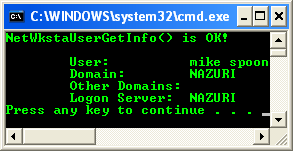
Build and run the project. The following screenshot is a sample output.
< Win32 Network Management APIs 25 | Win32 Network Management APIs | Win32 Programming | Win32 Network Management APIs 27 >